A commercial audio system should deliver clear, consistent sound throughout a business without creating excessively loud or quiet areas. Whether the system is used for background music, announcements, presentations, paging, or live entertainment, its performance depends on proper design—not simply the number or price of the speakers.
Armtech Services designs and installs commercial audio systems throughout Los Angeles and surrounding areas. We work with restaurants, bars, offices, retail stores, warehouses, conference rooms, hospitality properties, and other commercial facilities.
This guide explains how commercial audio systems work, how speakers and amplifiers should be selected, and what business owners should consider before beginning an installation.
What Is a Commercial Audio System?
A commercial audio system distributes music, speech, or other audio across one or more areas of a business.
Depending on the property, a system may include:
- Ceiling or surface-mounted speakers
- Outdoor speakers
- Commercial amplifiers
- Audio mixers
- Microphones
- Paging equipment
- Streaming music sources
- Televisions and presentation equipment
- Independent audio zones
- Wall-mounted volume controls
- Equipment racks
- Network-connected audio equipment
- Smart automation and centralized controls
Commercial systems are designed around the business’s layout, operating needs, noise level, and customer experience.
Where Are Commercial Audio Systems Used?
Commercial audio solutions can be customized for many environments:
- Restaurants and bars
- Retail stores
- Offices
- Conference rooms
- Medical and dental offices
- Gyms and fitness studios
- Hotels
- Schools and training facilities
- Warehouses
- Houses of worship
- Apartment common areas
- Outdoor dining areas
- Showrooms
- Salons and spas
Each type of business requires a different approach. A quiet medical office does not need the same system as a restaurant, gym, warehouse, or live-performance venue.
Background Music, Paging, or Both?
Before selecting equipment, determine what the system must accomplish.
Background music
Background music improves the atmosphere for customers and employees. The sound should be consistent, comfortable, and appropriate for the space.
Paging and announcements
Paging systems prioritize speech clarity. Announcements must remain understandable even in noisy areas or large rooms.
Television and presentation audio
Conference rooms, sports bars, training facilities, and hospitality spaces may need audio from televisions, projectors, computers, or video-conferencing systems.
Live audio
Restaurants, bars, event spaces, and houses of worship may need microphones, mixers, professional speakers, and connections for DJs or performers.
Combined systems
A commercial system may support background music during normal operations and automatically lower or mute the music when a page or announcement is made.
Defining these requirements early prevents unnecessary equipment changes later.
Proper Commercial Speaker Placement
Speaker placement has a major effect on coverage and sound quality.
Installing too few speakers usually produces loud areas near each speaker and weak coverage elsewhere. A better design uses enough speakers to distribute sound evenly at moderate volume.
Speaker placement should consider:
- Ceiling height
- Room dimensions
- Wall and ceiling construction
- Customer and employee locations
- Furniture and shelving
- Ambient noise
- Outdoor areas
- Speaker coverage patterns
- Property boundaries
- Desired volume
- Paging requirements
Speakers should not be placed only where installation is easiest. They should be positioned according to the way the space will actually be used.
Ceiling Speakers vs. Surface-Mounted Speakers
Ceiling speakers
Ceiling speakers offer a clean appearance and work well in offices, restaurants, retail stores, and other spaces with suitable ceilings.
Benefits include:
- Discreet appearance
- Even overhead coverage
- Reduced wall clutter
- Effective background-music distribution
However, ceiling construction, insulation, ductwork, lighting fixtures, sprinklers, and other building systems may affect placement.
Surface-mounted speakers
Surface-mounted speakers are installed on walls, columns, ceilings, or structural supports.
They are useful when:
- The ceiling is inaccessible
- Higher output is required
- The room has an open ceiling
- Directional coverage is needed
- The system serves an outdoor area
The correct option depends on the architecture and performance requirements.
What Is a 70-Volt Commercial Audio System?
A 70-volt audio system is commonly used when many speakers must operate over longer cable distances.
Each compatible speaker has a transformer with selectable power settings, commonly called taps. The selected tap determines how much power the speaker uses from the amplifier.
Advantages can include:
- Connecting many speakers to one amplifier
- Simplified power calculations
- Longer cable runs
- Easier expansion
- Individual speaker-level adjustment
- Efficient distribution across large properties
A 70-volt system is often suitable for restaurants, offices, retail stores, warehouses, and outdoor commercial spaces.
However, it is not automatically the best choice for every application. High-performance listening areas, live entertainment, studios, and certain conference rooms may require a different design.
Calculating Amplifier Power
The amplifier must provide enough power for all connected speakers without operating continuously at its maximum capacity.
For a 70-volt system, add the tap setting of every speaker connected to the amplifier channel. The amplifier should provide additional headroom above the calculated speaker load.
For example, a system with ten speakers set to 10 watts each creates a 100-watt connected load. The amplifier should be selected with appropriate reserve capacity instead of being sized at exactly 100 watts.
Other factors include:
- Number of audio zones
- Desired sound pressure
- Speaker efficiency
- Cable distance
- Subwoofers
- Paging priority
- Future expansion
- Indoor and outdoor coverage
Improper amplifier sizing can cause distortion, overheating, equipment shutdown, or speaker damage.
Creating Multiple Commercial Audio Zones
Different areas of a business often need independent volume and source control.
Typical zones include:
- Lobby
- Dining room
- Bar
- Patio
- Restrooms
- Kitchen
- Private dining room
- Office area
- Conference room
- Warehouse
- Reception
- Employee areas
A restaurant, for example, may play comfortable background music in the dining room, louder music at the bar, and a lower level on the patio. The office may need an entirely different source or no music.
Commercial audio zones can provide:
- Independent volume
- Different music sources
- Scheduled operation
- Paging to selected areas
- Individual muting
- Separate indoor and outdoor control
The number of required zones should be determined before the equipment and wiring are selected.
Paging and Announcement Systems
A paging system may use a desk microphone, telephone interface, wall station, network device, or other compatible source.
Paging systems can be configured to:
- Make announcements throughout the property
- Page only selected zones
- Lower background music during an announcement
- Play notification tones
- Support emergency messages
- Communicate between separate departments
Speech intelligibility matters more than simply increasing volume. Speaker location, room acoustics, microphone quality, and system tuning all affect how clearly announcements can be understood.
Paging and life-safety systems are not automatically interchangeable. Emergency systems may be governed by specific building, fire, accessibility, and electrical requirements. Appropriate licensed professionals and authorities should be involved when required.
Commercial Outdoor Audio
Restaurants, hotels, apartment communities, and event venues frequently need audio on patios, pool decks, entry areas, and outdoor dining spaces.
Outdoor installations require attention to:
- Weather-resistant speakers
- Sun and moisture exposure
- Coastal corrosion
- Outdoor-rated cable
- Conduit and sealed connections
- Property boundaries
- Nearby residences
- Local noise requirements
- Secure equipment mounting
- Landscape and irrigation systems
Using several properly positioned speakers at moderate volume generally produces better coverage and less sound spill than using only a few loud speakers.
Commercial Audio Wiring
Reliable wiring is the foundation of a commercial sound system.
The installation may require:
- Plenum-rated cable
- Riser-rated cable
- Outdoor-rated cable
- Conduit
- Cable supports
- Proper labeling
- Equipment-rack termination
- Fire-rated penetrations
- Separation from high-voltage wiring
- Compliance with applicable codes
The correct cable depends on the building, pathway, environmental conditions, system design, and applicable regulations.
Every cable should be identified at both ends. Proper documentation and labeling make future service and expansion substantially easier.
Equipment Racks and System Organization
Commercial audio equipment should be installed in a secure, ventilated, and serviceable location.
A properly organized equipment rack can hold:
- Amplifiers
- Audio processors
- Mixers
- Streaming equipment
- Network switches
- Power conditioning
- Control equipment
- Patch panels
- Video-distribution equipment
Clean rack installation improves airflow, troubleshooting, equipment protection, and future maintenance.
The rack should not be installed where unauthorized people can frequently change settings or disconnect cables.
Music Sources and Business Licensing
A commercial audio system can receive music from streaming equipment, computers, media players, television receivers, or centralized automation systems.
However, a personal music-streaming subscription may not include permission for public playback in a commercial establishment. Business owners should verify that their music service and licensing arrangements permit commercial use.
The sound system and the legal right to play the content are separate issues. Installing commercial speakers does not automatically provide public-performance rights.
Network and Wi-Fi Requirements
Many modern audio systems use network connections for control, streaming, monitoring, or audio distribution.
An unreliable network can cause:
- Interrupted music
- Devices disappearing from control applications
- Slow system response
- Failed remote management
- Unstable video-conference audio
- Communication problems between networked components
Commercial audio equipment should not be added to an unplanned network without considering bandwidth, security, device management, coverage, and network segmentation.
Integrating Audio with Control4
Control4 can integrate compatible commercial audio, video, lighting, climate, and security equipment into one control system.
Depending on the project, users may control:
- Audio sources
- Individual zones
- Televisions and displays
- Projectors and screens
- Lighting scenes
- Climate settings
- Security cameras
- Access control
- Scheduled operations
For example, a restaurant’s opening scene could activate selected music zones and set appropriate lighting levels. A closing scene could turn off the audio and displays while adjusting lighting and other integrated equipment.
Compatibility must be verified before the system is designed.
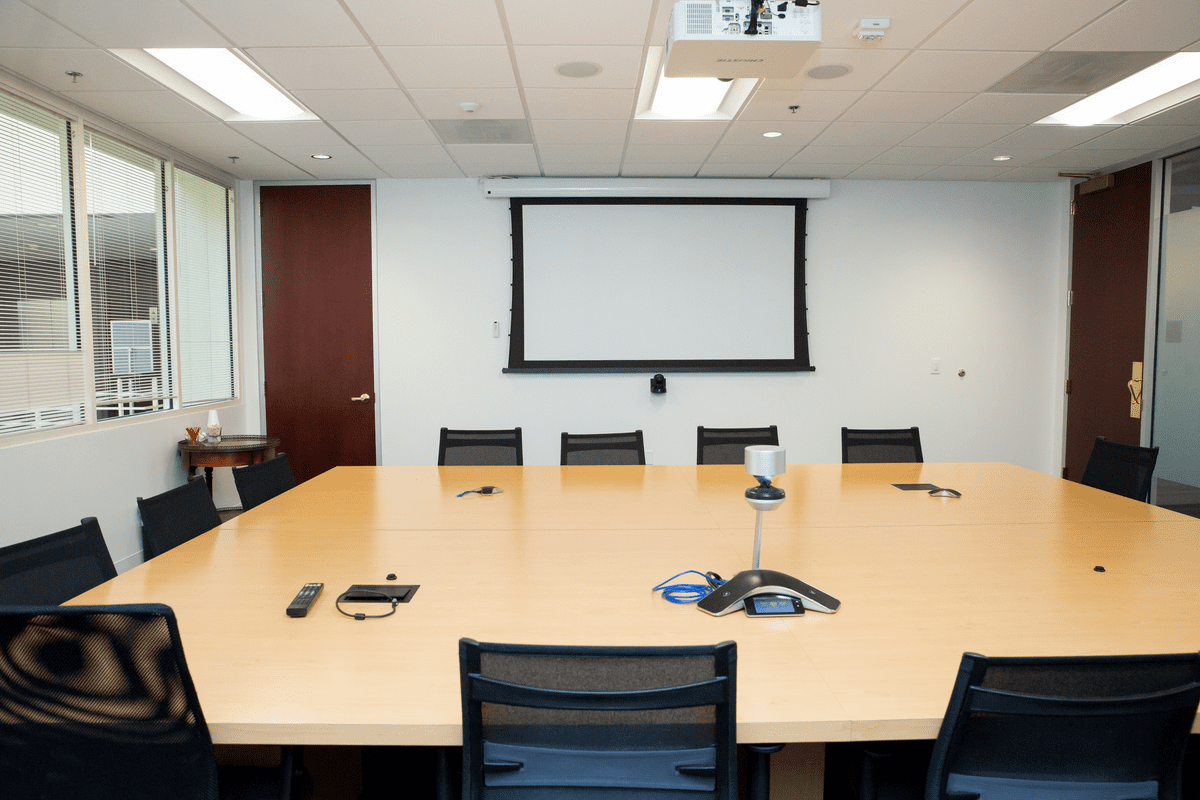
Conference Room Audio Systems
A conference room requires clear audio for both people inside the room and remote participants.
A complete system may include:
- Ceiling or table microphones
- Speakers
- Digital signal processing
- Echo cancellation
- Video-conferencing equipment
- Displays or projectors
- Wireless presentation
- Touchscreen control
- USB connectivity
- Equipment-rack integration
Room acoustics are especially important. Glass walls, hard floors, high ceilings, and other reflective surfaces can reduce speech clarity even when premium equipment is used.
Common Commercial Audio Installation Mistakes
Installing too few speakers
Too few speakers create uneven volume and poor coverage.
Selecting equipment before designing the system
Speakers and amplifiers should be selected after the zones, coverage, sources, and operational requirements are defined.
Ignoring room acoustics
Echo and excessive reflections can make speech and music difficult to understand.
Improper amplifier sizing
Connecting an excessive speaker load can damage equipment or cause unreliable operation.
Using the wrong cable
Cable must be appropriate for the building pathway, environment, and applicable requirements.
Failing to plan for future expansion
Extra rack space, conduit, amplifier capacity, and cable pathways can make future additions easier.
Placing controls where anyone can change them
Critical equipment settings should be protected from unauthorized adjustments.
Depending on unstable Wi-Fi
Permanent commercial systems require a properly designed network.
Forgetting staff training
Employees should understand basic operation without having access to advanced configuration settings.
How Much Does Commercial Audio Installation Cost?
Commercial audio system pricing depends on:
- Size and layout of the property
- Number and type of speakers
- Number of audio zones
- Ceiling height and accessibility
- Cable length and pathways
- Amplifier requirements
- Paging equipment
- Mixers and microphones
- Outdoor coverage
- Equipment-rack installation
- Network requirements
- Control and automation
- Programming and calibration
- Work-hour and access restrictions
- Permit or code-related requirements
A small office background-music system and a multi-zone restaurant with indoor audio, patio speakers, television sound, paging, and live entertainment require very different budgets.
A site survey is the most reliable way to determine equipment requirements and prepare an accurate proposal.
Why Professional System Design Matters
Professional installation includes more than mounting speakers.
A qualified commercial audio installer should:
- Inspect the property
- Determine audio zones
- Plan speaker coverage
- Calculate amplifier loads
- Select appropriate equipment
- Coordinate cable pathways
- Label and document wiring
- Configure sources and controls
- Tune the system
- Train staff
- Provide service and upgrade support
Planning prevents many of the performance and reliability problems caused by selecting equipment without understanding the complete system.
Frequently Asked Questions
How many speakers does my business need?
The number depends on the floor plan, ceiling height, speaker coverage, ambient noise, and intended volume. Square footage alone is not enough to design the system properly.
Is a 70-volt system better for commercial audio?
It is often a practical choice for systems with many speakers or long cable runs. However, the best format depends on the required sound quality and application.
Can different areas play different music?
Yes. A properly designed multi-zone system can provide independent source and volume control for different areas.
Can background music and paging use the same speakers?
Often, yes. The system may lower or mute the music automatically during announcements. Compatibility and priorities must be configured correctly.
Can you add audio to an existing business?
Yes. Existing buildings can often be upgraded, although ceiling access, construction, operating hours, and cable pathways can affect the installation method.
Can commercial audio integrate with televisions?
Yes. Compatible systems can distribute television audio to selected speakers or zones. Audio delays and source switching must be configured correctly.
Can Armtech Services install outdoor commercial speakers?
Yes. Armtech Services installs commercial outdoor audio for suitable patios, pool areas, dining spaces, and other exterior locations.
Commercial Audio Installation in Los Angeles
Armtech Services provides customized commercial audio, video, networking, security, low-voltage wiring, and automation solutions throughout Los Angeles and surrounding communities.
Our services include:
- Background-music systems
- 70-volt speaker systems
- Paging and announcement systems
- Restaurant and bar audio
- Conference-room audio and video
- Outdoor commercial speakers
- Multi-zone audio
- Amplifiers and audio processors
- Equipment-rack installation
- Network and Wi-Fi installation
- Control4 programming
- Commercial low-voltage wiring
Contact Armtech Services to schedule a site evaluation and discuss the right audio system for your business.